Showing posts with label software. Show all posts

Monday, October 30, 2006

Future of Touchscreens

Two laptop-ish links.
(1) Jeff Han demos his amazing touchscreen interface. Makes our current tablet PC capabilities look wimpy; but it also makes it look like the tablet interface is an indication of what's to come.
(2) Macs Only: A good site for free Mac applications.
fj

Tuesday, October 10, 2006

Cleaning Up Mac Desktops and Docs

Apple Folks-->

I just came across two li'l programs that might interest you.

1) Desktopple, a free program that does just one thing: temporarily hides all the icons on your desktop. Could be useful when hooking up to a projector, especially if the projector has lower resolution than your Mac. (I have a lot of detritus on my desktop, and syncing my screen with one of the projectors always jumbles my icons.) http://foggynoggin.com/desktopple

2) Overflow. This one costs fifteen dollars but has a free preview. Basically, this is to help you have quick access to all your applications but ALSO have a clean simple dock. It kind of gives you multiple docks to launch from. Really, you need to see it to understand, and, luckily, the software company has a handy video on the linked paged that shows you what it does. Worth a look if your dock is getting too full. http://www.stuntsoftware.com/Overflow/

2.5) Overflow is kind of a more elegant version of the free program Todos, which I linked to a few weeks ago: http://www.dbachrach.com/opensoft/index.php?page=Todos
That's all I've got,

fj

Monday, October 09, 2006

Two Annotated Lists of Online Applications

All--

* Does anyone know when or how or under what conditions the touch panel controller in RB 106 shut down? I'm going to work on getting it fixed, and it's always good to know how and why it stopped working.

* In the meantime, if you're in 106, you can make everything work with the remote. Instructions are on one of the guidance sheets/comics on the counter.

* Just a reminder: Please be sure to re-lock the doors on the cabinets in 106 and 107, if you open them.

For your reference and entertainment:

--> SlideShare is an interesting new online utility that let's you post PowerPoint presentations for retrieval online. You have to ask to be invited to use it, but if you ask, they'll invite you. (If that makes sense.) I'm expecting to play with this a little. It's kind of YouTube for PowerPoint.

--> Here and here you'll find interesting annotated lists of web-based applications that might prove useful to someone with a laptop computer teaching in a school with great wireless internet access. (Hey! That's you!) And here's a third list of interest, overviewing online note-taking tools.

I tend to glance at lists like this now and then, so that if I can be aware of tools like this when the time comes that they might be immediately useful. E.g., I knew about Flickr for months before I tried it, but I fired it up when I realized it could be useful for photo essay projects in 103. I spent ten minutes looking at Writely one day, and I didn't really put it to use until almost a year later, when I needed to collaborate with a couple of people on a piece of writing. Etc.

That is all.

Fred

Thursday, October 05, 2006

NVU for Free, Cross-Platform Web Design


Kenan asks:
Being in a laptop classroom where I am requiring websites has presented a problem we may not have foreseen. Not everyone has the same website creation software. My temporary solution has been to have them form study groups according to the type of software they are using. If anyone has any other suggestions let me know. I wonder if this is an issue that needs to be addressed as faculty.
My suggestion, as a first possible solution, is that we direct students to NVU, which is a free, well-respected, Mozilla-based web design program. And it's cross-platform, so your Macs and your PCs will be able to run it equally well. It's not as easy to do fancy rollovers and whatnot as it is to do them in Frontpage, but it's a-ok out of the box for basic web design.

There's a link here at the bottom of my "productivity" page at the help site, and you can go directly to it here.

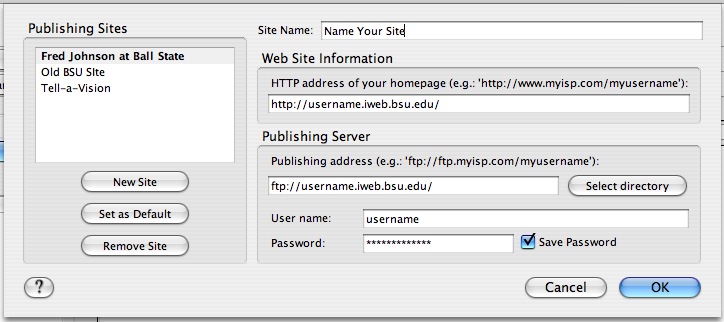
The image at the top shows what you need to enter to set up NVU to work with a BSU site. (Click the image to make it bigger.)